Custom Caption. Caption Stylizer for Social Media
Custom Caption
Pretty captions. Perfectly timed. Burned right into your video.
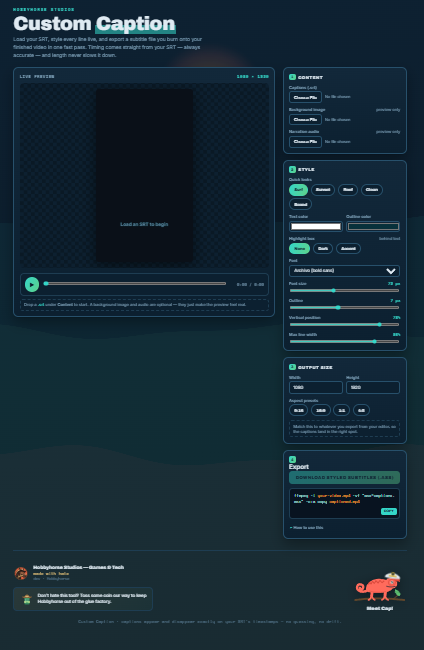
Custom Caption is a free, no-install styling studio for your subtitles. Drop in an SRT, design the look live, and walk away with a caption file that burns onto your finished video in a single fast pass — no real-time recording, no waiting around, no matter how long your video runs.
It does one thing, and it does it well: makes your captions look good without lying to you about what they can do.
What it does
- Loads your SRT and shows every line live, styled exactly as it'll burn.
- Accurate timing, always. Captions appear and disappear on your SRT's own timestamps. No word-by-word guessing, no drift, no captions racing ahead of the voice.
- Style it your way. Font, size, text color, outline color and thickness, line width, vertical position, and an optional highlight box behind the text.
- Quick looks to start from — Surf, Sunset, Reef, Clean, and Boxed — then tweak to taste.
- Any aspect ratio. Vertical 9:16, widescreen 16:9, square 1:1, portrait 4:5, or punch in your own width and height.
- Live preview over your own background image, with optional narration audio so you can watch the captions line up against the real voice.
- One-click export to a styled subtitle file, plus a ready-to-paste command that burns it onto your video.
How it works
- Build and export your video however you like — Active Presenter, your editor of choice, whatever.
- Style your captions here and download the file.
- Run the one-line command it hands you. Your captions are burned permanently into the picture in about a minute, even for a 30-minute video.
That's it. Length doesn't slow it down, because the heavy lifting is an encode, not a recording.
Honest fine print
Burning the captions in uses ffmpeg, a free tool you'll install once (grab it at ffmpeg.org). The styling lives here in the browser; the burn happens there. The exported file also opens directly in DaVinci Resolve, Premiere, or VLC if you'd rather not touch a command line.
Heads up for the editor crowd: apps like CapCut ignore imported subtitle styling and restyle the text themselves, so the burn-in route is what actually preserves the look you designed. We'd rather tell you that up front than let you find out the hard way.
Meet Cap
Every studio needs a first mate. Ours is a chameleon in a captain's hat who blends in over your video the same way your captions do. He doesn't do anything useful. He's just here. Say hi.
The fine fine print
Free to use. If it saves you some time and you're feeling generous, there's a tip jar in the footer — it keeps Hobbyhorse out of the glue factory.
Made with hate by Hobbyhorse Studios — Games & Tech.
P.S. I made this for using on Davinci Resolve, but ended up settling with CapCut after a lot of testing different softwares--as such, this isn't as tested as it could be and it probably won't be getting a ton of updates. The code IS AVAILABLE when you download this, so y'all are free to play with things as you will! If you reach out I can maybe help and do an update too. Just wanted all of this out there though--I had to tool all made, it worked for me, but I swapped softwares before launching this and didn't need it personally. BUT I figured some of you might want it and need it!
Download
Click download now to get access to the following files:
Development log
- Launch Version4 hours ago

Comments
Log in with itch.io to leave a comment.
Be sure to share any issues you might come across--I will try to help where I can! :)